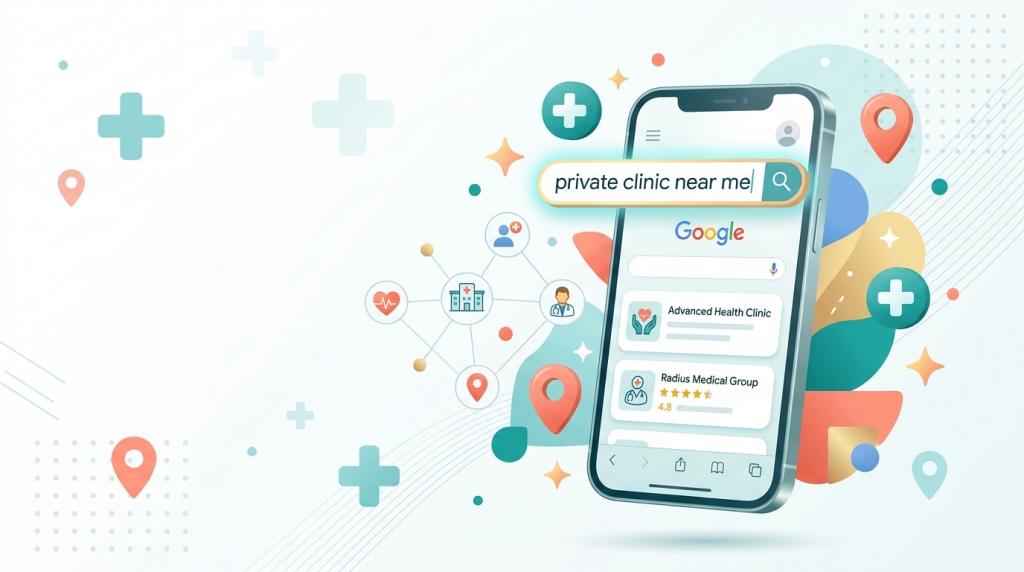
Your next patient is currently lying in bed at 11pm, Googling "is a clicking knee serious" while completely ignoring the three physiotherapy degrees hanging on your wall. This is how healthcare discovery works now. Terrifying, perhaps. But also fixable.
Want to know what they see when they search? More importantly, do you know how to make sure it's your clinic they find?
It's simpler than you might think. You don't need a marketing degree or a budget that rivals a pharmaceutical launch. You just need to understand the journey they're on and remove the friction that stops them choosing you. Let's walk through it.
Patients don't just search your name and book. They move through a process, and if you understand it, you can meet them at the exact moment they need you.
It always starts with a problem. "Persistent headaches causes," "lump on wrist what is it," or "child speech delay when to worry."
At this stage, they're not looking for a clinic. They're looking for information, reassurance, or simply someone to tell them they're not overreacting.
Here's your opportunity: if your website has a clear, helpful page that answers that exact question, you've just made the first impression. You're not a service yet; you're a helpful resource. That's a much better place to start.
Once they decide they need to see someone, the search changes. Now it's "private ENT specialist London" or "sports physio clinic Leeds reviews."
This is the comparison stage. They're scanning Google results, looking at star ratings, reading a review or two. They're checking if you look legitimate, professional, and trustworthy.
This is where your Google Business Profile does the heavy lifting. Often, it matters more than your actual website in this moment. Think of it as your shop window, except Google built the frame and you're not entirely sure where the light switch is.
They've narrowed it down to two or three clinics. The final question is simple: how easy is it to book?
Can they see your availability? Do they have to call during office hours and hope someone answers? Or can they book online when they're in bed, in pain, at 10pm on a Sunday?
The clinic that makes booking simple wins. Every single time.
Here's what happens thousands of times a day. Someone searches "private GP near me." Google shows a map with three clinics pinned on it. Each listing shows the clinic name, star rating, number of reviews, and opening hours.
Most people pick from those three results. They don't scroll down. They don't visit your website first. They look at the map and choose.
You spent years studying anatomy, but Google mostly wants to know if you've uploaded a photo of your waiting room. Algorithms are strange bedfellows.
If your Google Business Profile isn't claimed, complete, and up-to-date, you're invisible when it matters most.
Here's what to check this week. It'll take you twenty minutes:
When did you last book a restaurant without checking the reviews? Your patients do the same, except they're choosing who gets to look at their insides or manage their chronic pain. The stakes are slightly higher than choosing a pizza place.
A clinic with 100 reviews averaging 4.7 stars will almost always win over a clinic with 3 reviews averaging 5 stars. Volume and recency matter. A perfect score with hardly any reviews looks suspicious, like a hotel with only one dubious TripAdvisor review by epharmaceutical_launchntry that says "Changed my life!"
So how do you get more reviews without it feeling like begging?
Make it part of your normal routine. The best approach is straightforward. After a good appointment, send a follow-up message with a direct link to leave a Google review. In F365, your staff can be prompted to send these follow-up emails with a single click after every appointment.
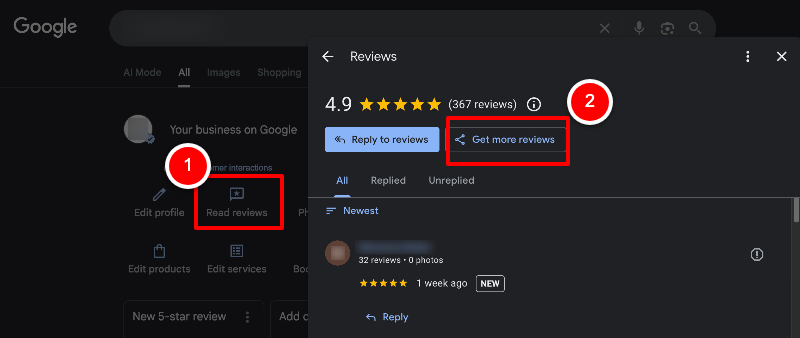
Something like: "Thanks for visiting us today. If you have a moment, we'd really appreciate a quick Google review, it helps other patients find us." Keep it warm and simple and make sure there's a clickable link for the patient to use in the email so they can go straight to your clinic's Google Business leave a review form.
TIP: if you're not familiar you can get this link for patients in your Google Business profile in three clicks:
One clinic we work with in London started doing this. They added the link to their post-appointment email. In three months, they went from 23 Google reviews to over 80. Their profile started appearing in search results for terms they never used to rank for. New patient enquiries went up.
The secret? Consistency. One review request after every appointment adds up fast.
And don't forget to reply. Respond to every review, the good ones and the not-so-good ones. A thoughtful reply to a less-positive review often shows you care more than a dozen five-star ratings. It tells potential patients you're listening and you're human.
Think about this for a second. Two clinics look equally good in search results. One has a "Book Online" button showing available slots for tomorrow. The other says, "Call us to arrange an appointment."
Which one gets the booking?
Clinics with real-time online booking simply convert more website visitors into patients. It's not just about convenience; it's about momentum. A patient who's ready to book at 9pm on a Sunday has either booked somewhere else, or is busy with work and life by Monday morning if they have to wait to call.
If your booking system requires patients to call during office hours and hope someone answers, you're essentially running a reservation system from 1987. At least 1987 had the excuse of not knowing any better.
This is where your practice management system really counts. If your booking tool shows live availability, syncs with your clinic calendar, and lets patients book themselves, you're removing the biggest barrier to patient acquisition.
If your current system doesn't do that, or if online booking is clunky and separate from your real schedule, it's worth asking if that's costing you patients every single week. That admin overhead isn't just time-consuming; it directly hurts your bottom line.
You don't need to run a busy blog. What you need are a few key pages that answer the questions your patients are already asking, using the words they'd actually use.
Many clinic websites describe services in clinical terms. "Musculoskeletal assessment and rehabilitation." But patients search for "back pain treatment" or "can a physio help with sciatica."
Here's where to focus your effort:
For each service you offer, write a page that describes it the way a patient would. What problem does it solve? What happens during the appointment? Who is it for? How much does it cost?
Yes, include pricing. Patients searching for private care expect to see it. Pages with clear pricing often rank better because they answer the patient's question more completely. Hiding costs behind a "contact us" wall just sends them back to the search results.
Gather the 15–20 questions your reception team answers most often. "Do I need a referral?" "How long is a first appointment?" "Do you offer evening slots?" "Can I use my insurance?"
Each of these is a search query. An FAQ page that answers them clearly can bring in a surprising amount of traffic. Plus, it saves your admin team time. They'll thank you for it.
If you serve a specific area, say so. Not in a forced way, but helpfully. "Our clinic is a five-minute walk from Leeds train station" is useful information that also helps Google understand where you are.
You don't have to do everything at once. If you're trying to grow patient numbers with limited time, start here:
These four steps will do more for your clinic's visibility than most small paid ads, and they cost nothing but a bit of focused time. They tackle the patient acquisition challenge head-on by making sure you're found and chosen.
A big part of being found is having the right tools working quietly in the background. Real-time online booking, a patient portal that actually helps patients manage their care, automated follow-ups, these aren't just fancy features. They directly decide whether a patient who finds you actually books with you.
When your software handles these things smoothly, it cuts your admin overhead and helps you attract more patients. It's a double win.
F365 is built as one complete system to do just that. It handles online booking with live availability, gives patients a useful portal, sends automated follow-up messages that still feel human, and keeps your clinic running without the usual chaos of multiple disconnected tools.
Ready to make your clinic easier to find and simpler to run?
Your next patient is currently lying in bed at 11pm, Googling "is a clicking knee serious" while completely ignoring the three physiotherapy degrees hanging on your wall. This is how healthcare discovery works now. Terrifying, perhaps. But also fixable.
Want to know what they see when they search? More importantly, do you know how to make sure it's your clinic they find?
It's simpler than you might think. You don't need a marketing degree or a budget that rivals a pharmaceutical launch. You just need to understand the journey they're on and remove the friction that stops them choosing you. Let's walk through it.
Patients don't just search your name and book. They move through a process, and if you understand it, you can meet them at the exact moment they need you.
It always starts with a problem. "Persistent headaches causes," "lump on wrist what is it," or "child speech delay when to worry."
At this stage, they're not looking for a clinic. They're looking for information, reassurance, or simply someone to tell them they're not overreacting.
Here's your opportunity: if your website has a clear, helpful page that answers that exact question, you've just made the first impression. You're not a service yet; you're a helpful resource. That's a much better place to start.
Once they decide they need to see someone, the search changes. Now it's "private ENT specialist London" or "sports physio clinic Leeds reviews."
This is the comparison stage. They're scanning Google results, looking at star ratings, reading a review or two. They're checking if you look legitimate, professional, and trustworthy.
This is where your Google Business Profile does the heavy lifting. Often, it matters more than your actual website in this moment. Think of it as your shop window, except Google built the frame and you're not entirely sure where the light switch is.
They've narrowed it down to two or three clinics. The final question is simple: how easy is it to book?
Can they see your availability? Do they have to call during office hours and hope someone answers? Or can they book online when they're in bed, in pain, at 10pm on a Sunday?
The clinic that makes booking simple wins. Every single time.
Here's what happens thousands of times a day. Someone searches "private GP near me." Google shows a map with three clinics pinned on it. Each listing shows the clinic name, star rating, number of reviews, and opening hours.
Most people pick from those three results. They don't scroll down. They don't visit your website first. They look at the map and choose.
You spent years studying anatomy, but Google mostly wants to know if you've uploaded a photo of your waiting room. Algorithms are strange bedfellows.
If your Google Business Profile isn't claimed, complete, and up-to-date, you're invisible when it matters most.
Here's what to check this week. It'll take you twenty minutes:
When did you last book a restaurant without checking the reviews? Your patients do the same, except they're choosing who gets to look at their insides or manage their chronic pain. The stakes are slightly higher than choosing a pizza place.
A clinic with 100 reviews averaging 4.7 stars will almost always win over a clinic with 3 reviews averaging 5 stars. Volume and recency matter. A perfect score with hardly any reviews looks suspicious, like a hotel with only one dubious TripAdvisor review by epharmaceutical_launchntry that says "Changed my life!"
So how do you get more reviews without it feeling like begging?
Make it part of your normal routine. The best approach is straightforward. After a good appointment, send a follow-up message with a direct link to leave a Google review. In F365, your staff can be prompted to send these follow-up emails with a single click after every appointment.
Something like: "Thanks for visiting us today. If you have a moment, we'd really appreciate a quick Google review, it helps other patients find us." Keep it warm and simple and make sure there's a clickable link for the patient to use in the email so they can go straight to your clinic's Google Business leave a review form.
TIP: if you're not familiar you can get this link for patients in your Google Business profile in three clicks:
One clinic we work with in London started doing this. They added the link to their post-appointment email. In three months, they went from 23 Google reviews to over 80. Their profile started appearing in search results for terms they never used to rank for. New patient enquiries went up.
The secret? Consistency. One review request after every appointment adds up fast.
And don't forget to reply. Respond to every review, the good ones and the not-so-good ones. A thoughtful reply to a less-positive review often shows you care more than a dozen five-star ratings. It tells potential patients you're listening and you're human.
Think about this for a second. Two clinics look equally good in search results. One has a "Book Online" button showing available slots for tomorrow. The other says, "Call us to arrange an appointment."
Which one gets the booking?
Clinics with real-time online booking simply convert more website visitors into patients. It's not just about convenience; it's about momentum. A patient who's ready to book at 9pm on a Sunday has either booked somewhere else, or is busy with work and life by Monday morning if they have to wait to call.
If your booking system requires patients to call during office hours and hope someone answers, you're essentially running a reservation system from 1987. At least 1987 had the excuse of not knowing any better.
This is where your practice management system really counts. If your booking tool shows live availability, syncs with your clinic calendar, and lets patients book themselves, you're removing the biggest barrier to patient acquisition.
If your current system doesn't do that, or if online booking is clunky and separate from your real schedule, it's worth asking if that's costing you patients every single week. That admin overhead isn't just time-consuming; it directly hurts your bottom line.
You don't need to run a busy blog. What you need are a few key pages that answer the questions your patients are already asking, using the words they'd actually use.
Many clinic websites describe services in clinical terms. "Musculoskeletal assessment and rehabilitation." But patients search for "back pain treatment" or "can a physio help with sciatica."
Here's where to focus your effort:
For each service you offer, write a page that describes it the way a patient would. What problem does it solve? What happens during the appointment? Who is it for? How much does it cost?
Yes, include pricing. Patients searching for private care expect to see it. Pages with clear pricing often rank better because they answer the patient's question more completely. Hiding costs behind a "contact us" wall just sends them back to the search results.
Gather the 15–20 questions your reception team answers most often. "Do I need a referral?" "How long is a first appointment?" "Do you offer evening slots?" "Can I use my insurance?"
Each of these is a search query. An FAQ page that answers them clearly can bring in a surprising amount of traffic. Plus, it saves your admin team time. They'll thank you for it.
If you serve a specific area, say so. Not in a forced way, but helpfully. "Our clinic is a five-minute walk from Leeds train station" is useful information that also helps Google understand where you are.
You don't have to do everything at once. If you're trying to grow patient numbers with limited time, start here:
These four steps will do more for your clinic's visibility than most small paid ads, and they cost nothing but a bit of focused time. They tackle the patient acquisition challenge head-on by making sure you're found and chosen.
A big part of being found is having the right tools working quietly in the background. Real-time online booking, a patient portal that actually helps patients manage their care, automated follow-ups, these aren't just fancy features. They directly decide whether a patient who finds you actually books with you.
When your software handles these things smoothly, it cuts your admin overhead and helps you attract more patients. It's a double win.
F365 is built as one complete system to do just that. It handles online booking with live availability, gives patients a useful portal, sends automated follow-up messages that still feel human, and keeps your clinic running without the usual chaos of multiple disconnected tools.
Ready to make your clinic easier to find and simpler to run?