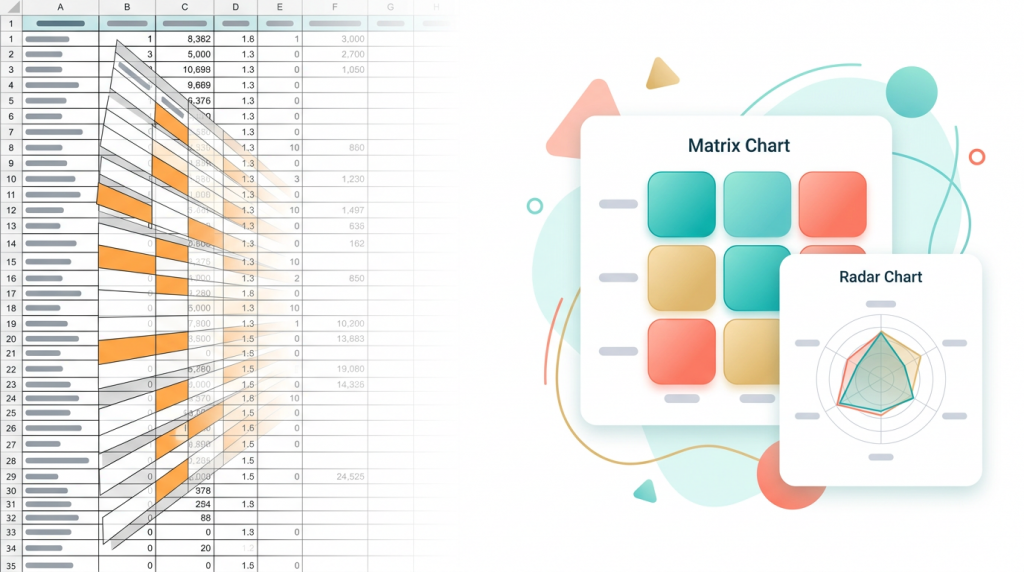
Somewhere in your clinic right now there’s a spreadsheet that everyone tiptoes around like it’s a sleeping cat. No one knows who built the conditional formatting, but it’s been turning cells a shade of orange nobody asked for since 2022.
If you’re a practice manager at a Functional Medicine, Integrative, or longevity clinic, you’ve probably seen the spreadsheet drill a hundred times. Patient scores go in. Someone copies the formula down, carefully, because last time column D shifted and the report said your top-performing protocol was negative 40. Every month, hours vanish into data entry, version wrangling, and a last-minute scramble to find a number a practitioner needs before their 2pm appointment.
Patient outcome tracking software should give you a cleaner way. It turns out the right visualisation does more than replace a spreadsheet, it saves time, spares sanity, and puts actionable insight exactly where it belongs: in the consultation, not on a shared drive with fourteen conflicting copies.
A typical Functional Medicine clinic tracking six outcome measures across 200 active patients is wrestling with:
Every hour you spend nursing formulas is an hour you’re not spending on the operational work that actually grows the clinic. The fix isn’t a better spreadsheet, it’s a system built to do this job from the start.
Patient outcome tracking software inside Function 365 doesn’t just dump numbers into a table. Four visualisation types come baked into the Health Scores & Biomarkers tools, and each answers a different question.
A matrix chart lays out multiple biomarkers or health scores in a colour-coded grid, essentially a heat map for one person’s health data. If your clinic tracks ten, fifteen, or twenty markers simultaneously (vitamin D, ferritin, cortisol, thyroid panel, inflammatory markers… the list never stops), the matrix gives you the whole picture in a single glance. Patterns jump out without scrolling. Clusters of deficiency. Areas that are moving. Markers that have apparently decided to sit this one out.
A longevity clinic running a micronutrient optimisation protocol might see, at a glance, which of a patient’s twelve tracked nutrients are trending into range and which are stubbornly low. That’s a conversation starter in the consultation, not a twenty-minute data-hunting expedition beforehand.
Radar charts (sometimes called spider charts) map multiple variables onto radiating axes and connect them into a shape. Overlay two shapes, one from intake, one from the latest assessment, and you get an instant visual of how a patient’s profile has changed, no need to compare numbers line-by-line.
They shine for composite outcome measures. If your clinic uses the MSQ or a custom functional assessment, a radar plot shows which domains improved and which didn’t, so the practitioner and patient can see the shape of progress in seconds.
Line charts do what they say on the tin, one score tracked over time. Simple, familiar, and effective for showing whether a PHQ-9, pain score, or HbA1c is heading in the right direction.
When you need to compare discrete values, scores at specific time points, or several outcome measures stacked against each other, bar charts do the job neatly.
All four chart types live inside the Patient Hub. A practitioner reviewing a follow-up doesn’t open a separate report or navigate away from the patient’s note. The matrix or radar plot sits right there, ready to walk through with the patient. People engage with shapes and colours far more than with a list of numbers, and that kind of transparent, evidence-based communication tends to keep patients coming back.
Tracking an individual’s progress is useful. Seeing patterns across your whole patient population turns outcome measurement into something strategic.
Filter live data by diagnosis, age, medication, or your clinic’s branded care protocols, and you can answer questions like:
No pivot table expertise required. No exporting to a third tool. The filters work on live data, and the charts and exportable reports generate automatically. For a practice manager, the monthly report that used to swallow a full afternoon now takes minutes. For a clinical director, it means evidence-based protocol conversations grounded in real data rather than a feeling that “things seemed better this quarter.”
The most elegantly designed outcome tracking system falls flat if patients don’t fill in their questionnaires. Function 365’s Smart Intake reminders handle that, automated prompts that nudge patients to complete their outcome measures before or at the point of care. No chasing by email. No sticky note on the reception desk that went missing. Complete data comes in, reliable charts come out.
If your clinic does clinical research, audit, or wants to publish outcomes data, structured and coded scores save you the worst part of the job: the data-cleaning marathon that sits between “we have the numbers” and “we can actually analyse them.” Because outcome data inside Function 365 is already structured, and can be automatically anonymised for export, you skip that step entirely.
Combine that with the ability to code diagnoses using ICD-10 or SNOMED CT directly in the patient record, and your outcome data links to precise, standardised codes. That’s practical foundations for credible outcomes research, built into the normal clinical workflow rather than bolted on afterwards.
If you’re spending hours each week keeping a spreadsheet alive, compiling reports manually, and fielding last-minute requests from practitioners who need patient data before their next appointment — there’s a simpler way. Function 365’s Health Scores & Biomarkers tools give you matrix charts, radar plots, line charts, and bar charts built directly into your EHR. No manual data entry, no version control headaches, no unreadable conditional formatting from a colleague who left the clinic eighteen months ago.
See Function 365 in action - book a personalised 30-minute walkthrough
Somewhere in your clinic right now there’s a spreadsheet that everyone tiptoes around like it’s a sleeping cat. No one knows who built the conditional formatting, but it’s been turning cells a shade of orange nobody asked for since 2022.
If you’re a practice manager at a Functional Medicine, Integrative, or longevity clinic, you’ve probably seen the spreadsheet drill a hundred times. Patient scores go in. Someone copies the formula down, carefully, because last time column D shifted and the report said your top-performing protocol was negative 40. Every month, hours vanish into data entry, version wrangling, and a last-minute scramble to find a number a practitioner needs before their 2pm appointment.
Patient outcome tracking software should give you a cleaner way. It turns out the right visualisation does more than replace a spreadsheet, it saves time, spares sanity, and puts actionable insight exactly where it belongs: in the consultation, not on a shared drive with fourteen conflicting copies.
A typical Functional Medicine clinic tracking six outcome measures across 200 active patients is wrestling with:
Every hour you spend nursing formulas is an hour you’re not spending on the operational work that actually grows the clinic. The fix isn’t a better spreadsheet, it’s a system built to do this job from the start.
Patient outcome tracking software inside Function 365 doesn’t just dump numbers into a table. Four visualisation types come baked into the Health Scores & Biomarkers tools, and each answers a different question.
A matrix chart lays out multiple biomarkers or health scores in a colour-coded grid, essentially a heat map for one person’s health data. If your clinic tracks ten, fifteen, or twenty markers simultaneously (vitamin D, ferritin, cortisol, thyroid panel, inflammatory markers… the list never stops), the matrix gives you the whole picture in a single glance. Patterns jump out without scrolling. Clusters of deficiency. Areas that are moving. Markers that have apparently decided to sit this one out.
A longevity clinic running a micronutrient optimisation protocol might see, at a glance, which of a patient’s twelve tracked nutrients are trending into range and which are stubbornly low. That’s a conversation starter in the consultation, not a twenty-minute data-hunting expedition beforehand.
Radar charts (sometimes called spider charts) map multiple variables onto radiating axes and connect them into a shape. Overlay two shapes, one from intake, one from the latest assessment, and you get an instant visual of how a patient’s profile has changed, no need to compare numbers line-by-line.
They shine for composite outcome measures. If your clinic uses the MSQ or a custom functional assessment, a radar plot shows which domains improved and which didn’t, so the practitioner and patient can see the shape of progress in seconds.
Line charts do what they say on the tin, one score tracked over time. Simple, familiar, and effective for showing whether a PHQ-9, pain score, or HbA1c is heading in the right direction.
When you need to compare discrete values, scores at specific time points, or several outcome measures stacked against each other, bar charts do the job neatly.
All four chart types live inside the Patient Hub. A practitioner reviewing a follow-up doesn’t open a separate report or navigate away from the patient’s note. The matrix or radar plot sits right there, ready to walk through with the patient. People engage with shapes and colours far more than with a list of numbers, and that kind of transparent, evidence-based communication tends to keep patients coming back.
Tracking an individual’s progress is useful. Seeing patterns across your whole patient population turns outcome measurement into something strategic.
Filter live data by diagnosis, age, medication, or your clinic’s branded care protocols, and you can answer questions like:
No pivot table expertise required. No exporting to a third tool. The filters work on live data, and the charts and exportable reports generate automatically. For a practice manager, the monthly report that used to swallow a full afternoon now takes minutes. For a clinical director, it means evidence-based protocol conversations grounded in real data rather than a feeling that “things seemed better this quarter.”
The most elegantly designed outcome tracking system falls flat if patients don’t fill in their questionnaires. Function 365’s Smart Intake reminders handle that, automated prompts that nudge patients to complete their outcome measures before or at the point of care. No chasing by email. No sticky note on the reception desk that went missing. Complete data comes in, reliable charts come out.
If your clinic does clinical research, audit, or wants to publish outcomes data, structured and coded scores save you the worst part of the job: the data-cleaning marathon that sits between “we have the numbers” and “we can actually analyse them.” Because outcome data inside Function 365 is already structured, and can be automatically anonymised for export, you skip that step entirely.
Combine that with the ability to code diagnoses using ICD-10 or SNOMED CT directly in the patient record, and your outcome data links to precise, standardised codes. That’s practical foundations for credible outcomes research, built into the normal clinical workflow rather than bolted on afterwards.
If you’re spending hours each week keeping a spreadsheet alive, compiling reports manually, and fielding last-minute requests from practitioners who need patient data before their next appointment — there’s a simpler way. Function 365’s Health Scores & Biomarkers tools give you matrix charts, radar plots, line charts, and bar charts built directly into your EHR. No manual data entry, no version control headaches, no unreadable conditional formatting from a colleague who left the clinic eighteen months ago.
See Function 365 in action - book a personalised 30-minute walkthrough